
Who’s sick of the Kodi add-on game of whack-a-mole? You know the game, right? You install the latest streaming video add-on for Kodi and it’s great. Then, they get shut down (whacked, so to speak). So then another fork of that plugin pops up somewhere else, so you jump into that one, only to find out that the repo for that was taken offline. You repeat these same steps over and over again.
Lately, the Kodi community has taken a huge hit because of all this chasing the next add-on only to break a week later. People are getting fed up and some are switching over to Android APKs like Terrarium. But, don’t think for a moment that those are any less likely to have this same issue in a matter of time. Oh wait, they did.
Well, there’s good news, Kodi enthusiasts!
There is a new way to install Kodi add-ons that doesn’t require someone’s server to host the repository installers. With TVAddons’ new GitHub Add-on Installer as part of their Indigo add-on, you won’t ever need to add more file sources to install repositories to get add-ons.
According to the announcement from TVAddons,…
Behind us are the days where you were restricted to Kodi addons made available through our Fusion Installer or clones. Not only does the Git Browser give users more choice, it empowers independent developers. Now developers can more easily distribute their addons to the masses. Aligning themselves with a particular group or community to facilitate addon distribution will no longer be necessary. We hope to see developers and blogs more readily advertise their GitHub usernames. Welcome to a new age in Kodi addon development!
How to Install the Fusion Installer
- Go to Settings (cog icon) > File Manager

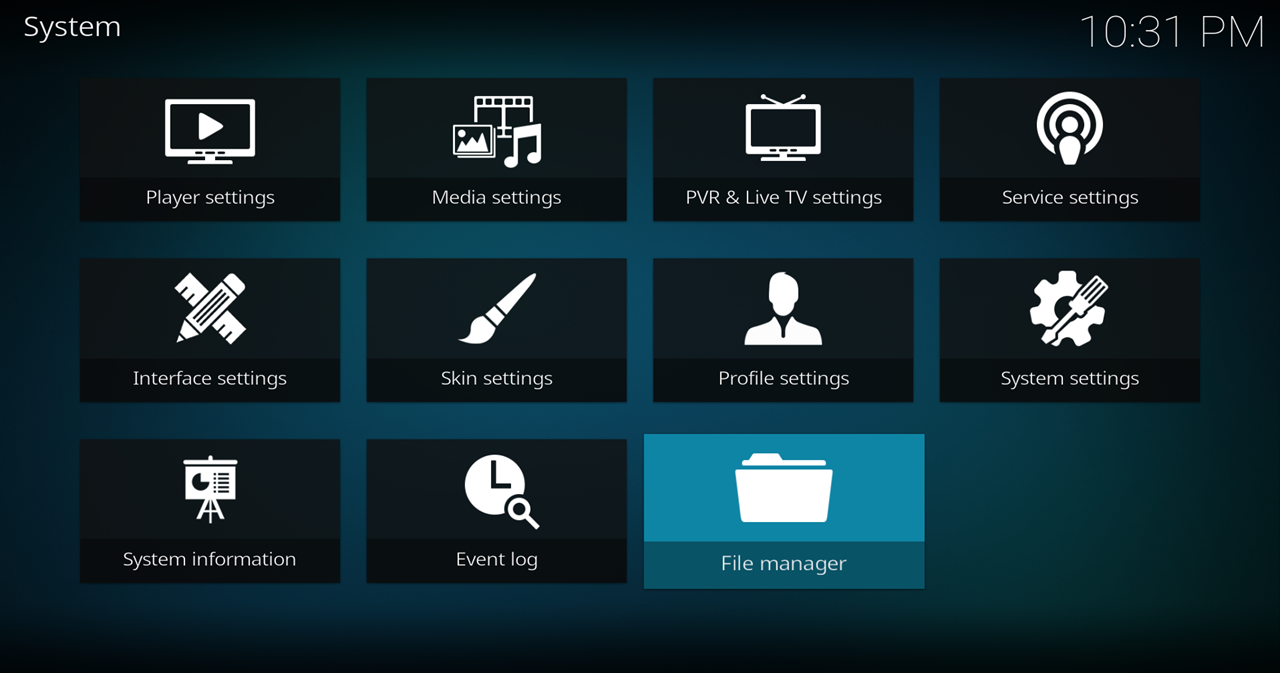
- Select Add Source
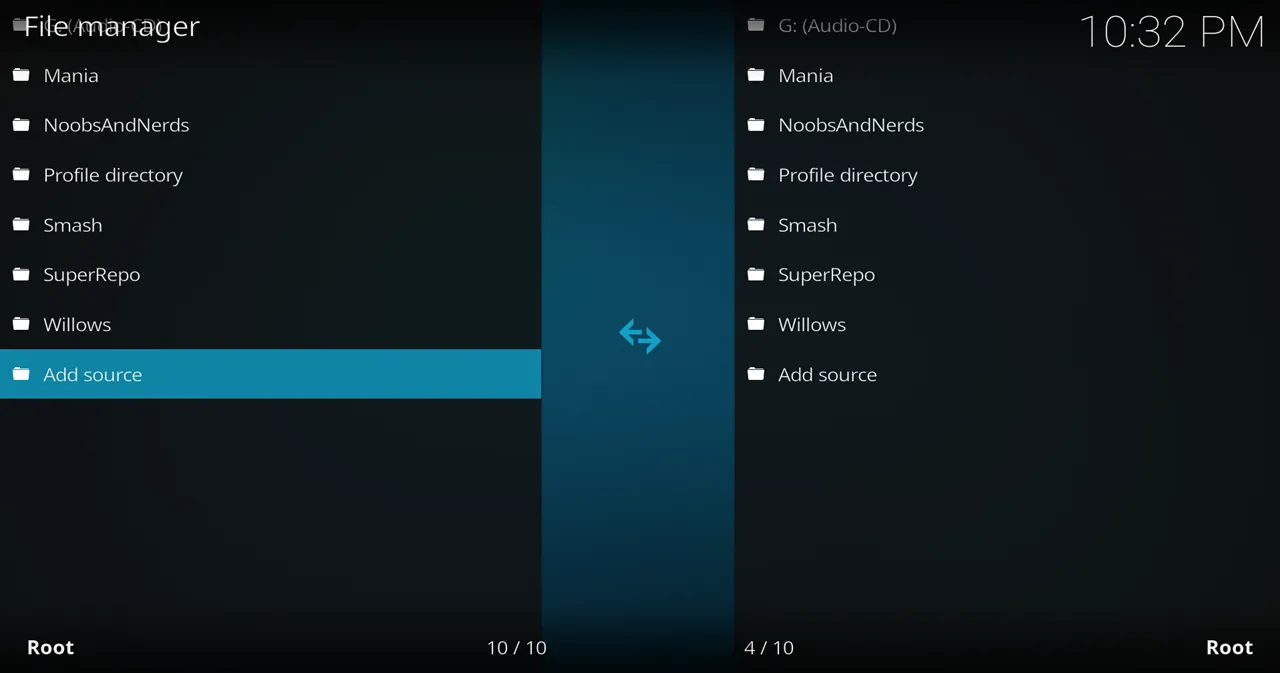
- Click on the <None> box and type in the URL of the repo server: http://fusion.tvaddons.co
- Give it a name in the box below (name it Fusion)

How to Install the Indigo Add-on from Fusion
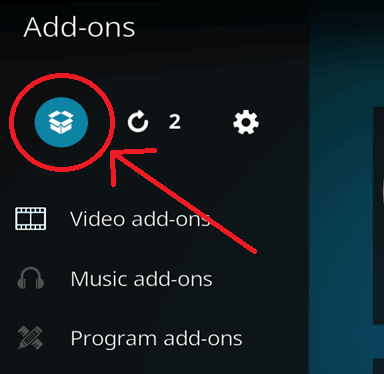
- Now, go to the Add-on Browser screen by clicking on Add-ons on the main menu and then selecting the open box icon at the top.
- Go to Install from Zip File > Fusion> plugin.program.indigo-x.x.x.zip (x’s are just placeholder in case the numbers change)


How to Use the GitHub Browser to Install Add-ons
- Open the Indigo add-on from the Add-ons menu.

- Select Addon Installer.

- Select GitHub Browser.

- You will be greeted with instructions about the GitHub Browser. Press any key to dismiss it.

- Select Search by GitHub Username and then type the GitHub username of a Kodi add-on developer.

- You will then have a list of all of the add-ons from that developer. Click on one of them to install it.
- Remember to restart Kodi after you have installed all the add-ons you want for now. The add-ons often won’t work properly until you’ve restarted Kodi.
List of GitHub Usernames for Kodi Add-ons
Installing the GitHub Browser add-on is great and all, but it doesn’t do you any good if you don’t know which GitHub usernames to search for!
Ultimate List of GitHub Usernames for Kodi Repos & Add-ons (Updated Daily)
Keep Up-to-Date on Kodi
Thanks for coming to Kinkead Tech to learn about Indigo’s GitHub add-on installer. If you enjoy my tutorials, please subscribe to my weekly email.
Kodi Streamers: Remember to Use a VPN
Whether you need to get around your ISP blocking/throttling your streaming OR you just want to keep your video streaming private, I always recommend Kodi streamers use a VPN. To learn more, read my 4 Reasons Why Kodi Streamers Need a Kodi VPN.
Having Kodi Streaming Issues?
If you’re having issues with buffering, low quality streams, “no stream available”, please check out my list of Troubleshooting Tips for Kodi Streaming Issues.
Questions or Comments?
What do you think about this new way of installing add-ons? I mean, sure, you have to go through the same old installation process to get Indigo. Plus, some people have their feelings or suspicions about the Indigo app. What do you think? Let us know in the comments below. Thanks!


I have no idea where to discover a Gitgub username to start the whole process. I was able to easily set up everything just fine as per your instruction but where does one discover these usernames? Thanks in advance
I’m not sure why people down voted your comment because it’s a legitimate question. My intention is post more tutorials that include the Github username much like the one I published today about Incursion. That developer username is kodibae.
Thanks for giving us at least one name to start with! :-)
You’re welcome
I agree, what use is this if we have no name for the developer??? Or, can you suggest a way to obtain that information?
I will be posting more tutorials like the one today that includes the Github developer username.
I down know what kodi developer to add in his or her name?? HELP
Is there a rated list of developers so we know what name to put in? I haven’t installed this yet as I have no idea who or what name to put in.
Using GitHub and tvaddonsco to load France 24 on TvFireStick. Install was no issue. However, when France 24 opens the live streaming crashes after about 10-20 secs. Same issue on different TvFireSticks. Other live TV streams working great! Any suggestions?
Sounds like there must be an issue with that add-on since it happened on multiple devices. The method of installing it using GitHub should not make any difference at all to the performance of the add-on.
My thoughts also, as I’ve just had the same issue with an android TV box. I have used this app before on another repo which is no longer maintained/deleted. Will look into some other options for a work around.
Tx
Is that a typo just in the comment or did you also misspell it in the Kodi file manager. There’s no “h” in fusion.
When I click on the search part, nothing comes up!
First, make sure you don’t have the old tvaddons.ag repo. You need the new tvaddons.co repo. From the add-on browser, then install from repository, scroll down and see if it lists TVADDONS.CO Add-on Repository or if it says TVADDONS.AG Add-on Repository. If it says AG, highlight it and go to the context menu, go to Information and uninstall it. Then open up Indigo again and see if you can get to git browser.
If it still doesn’t work, go to My Add-ons > All Add-ons -> TVAddons.CO and select Update in the Context menu.
I love the idea of just adding the addons I like instead of ALL THAT BAGGAGE that comes with builds. I’ve got one question… how can I have the addons i like but in the skin that comes with the kodiworld / luxury build? I love that skin but don’t know how to set it up myself.
What skin is it? You should be able to see it in Settings > Interface settings > Skin. By a Google search, it looks similar to Aeon Nox, but customized colors and images.
Also, https://kinkeadtech.com/best-kodi-skins/
Hi.. I get to the point of install where your instructions say to Click on “search by GitHub Usernames “ (it’s highlighted in yellow) I click and nothing happens . Any idea ? Thanks for all the informative emails! Jerry
I’ve had that happen on just one of my Kodi devices, but I haven’t figured out why. If you figure it out, please let me know.
Know of any alternatives to Github Browser installer addon, I hate the tvaddons bs of screwing with other addons.
Anyone know GitHub Browser add-on alternative that works good