One of the best tools for keeping a cluttered inbox organized to keep important emails at the top is the “Multiple Inboxes” feature in Gmail Labs (in the Gmail Settings). I have set mine so that there are 3 extra panes of email above my inbox. Those are for Drafts, Follow-ups, and Notifications from our intranet system in Quickbase.  In conjunction with this, I have created a filter that pulls all Quickbase notification emails and puts them in a label called “QB” and archives them, which removes them from the inbox. Now, all of those notifications will be in this pane instead of the normal inbox. Also, as soon as I read those notifications, they disappear because of the parameter “is:unread” from the parameters below. Here is my configuration for Multiple Inboxes…
 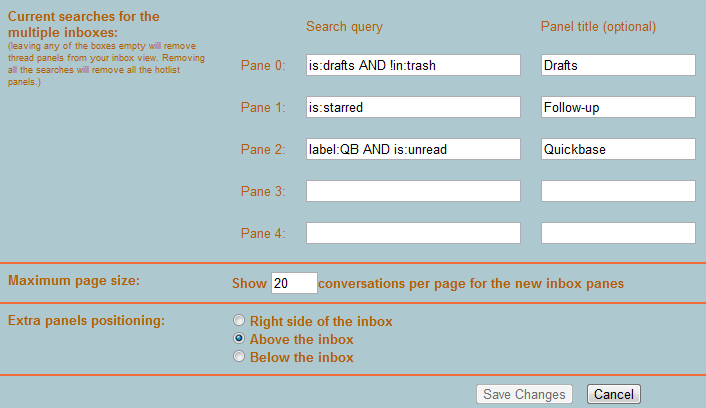 If you have found a creative use for Multiple Inboxes, share in the comments below.
Use Multiple Inboxes In Gmail to Pull Out the Important Stuff



Table of Contents
0
0
votes
Article Rating
Subscribe
Login
0 Comments
Oldest
Newest
Most Voted
Inline Feedbacks
View all comments